Samsung Food: Swap Meals in the Tailored Plan
As Lead Product Designer at Samsung Food, I ran the meal swap workstream for the Tailored Plan on a Beta-feedback brief to let users change a recommended meal they did not want, and we took it across thirteen sprints from combo and food swaps at every entry point down to a randomised swap in place, free for all users.
Outcome
Beta users had asked for a way to change a meal they did not want in the Tailored Plan, and the swap went live there free for all users. To keep the experience consistent, I aligned the meal cards with Explore and Home and deprecated the plus icon in favour of the add to plan icon across the app. No usage figure reached design before I left, so none is quoted here.
Context
Tailored Plan v1, the Tailored for you page from Health v1, listed a week of recommended meals matched to the user’s nutrition goals. It was in Beta, with three rows in view and the rest behind the freemium gate. It sat between the casual planner, released that spring, and the prepopulated planner that later generated the week from it. Beta users asked for a way to change a recommended meal they did not want.
The brief, “enable meal swapping in TP v1, randomised swap”, was to show premium users recipe alternatives first, then scale depending on user interaction. We ran the workstream as numbered sprints, one Figma page per sprint, each opening with a sprint overview of the brief, the pair on it, the link to the Notion brief and what had changed since the last one. Thirteen sprints ran from Sprint 0 to Sprint 12, with a design review at Sprint 10 on its own prototypes page and a components page kept alongside.
Letting users change a meal they did not want
A meal in the plan could be a single recipe or a combo, a recipe with sides, so the swap had to work for both shapes. In Sprint 0 we mapped it onto the existing Tailored for you carousel on Home and Explore. A single recipe swaps for another recipe. A combo had three options: swap the whole combo for another, swap it component by component from a tabbed sheet, or search for a replacement by name. The entry point was Swap meal in the card’s overflow menu, beside the actions users already took on a meal: Add to, Send recipe and Save recipe.
In Sprint 1 we built out the journeys, covering the candidate list with search, a no options found state that hands over to search all recipes when there is no candidate, a Meal swapped toast with Undo, and the same flow for foods, an apple swapped for a pear with the recent foods search behind it.
Sprint 0, the combo options. Each runs from the tailored carousel through the overflow menu to a candidate list.
Open in Figma ↗ Get password →Sprint 1, the journeys. Five flows, each from the tailored carousel, with the PO’s note on nutrition.
Open in Figma ↗ Get password →01Scope
Showing nutrition against the daily target in the quick view
The quick view gave a candidate’s nutrition in grams per serving, so users could not see how a meal fitted their goals. In Sprint 1 the PO left a note on it asking for percent of the daily target, and the plan’s own nutrition goals later read the same way. In Sprints 2 and 3 we answered the note with a cleaner nutrition module in the quick view. We also tidied the same journeys for an RFC to collect engineering’s comments before the build: the recipe swap from the tailored carousel, the food swap, the quick view, and entry points from the Recipes for your oven and Breakfast ideas collections. Sprint 3 is stamped 99% late stage on its overview, “minor updates on iteration 2, ready to share on RFC”.
Sprint 3, the cleaner nutrition module. The daily nutrition goal as percentages, with Swap and Add to plan beneath it.
Open in Figma ↗ Get password →Descoping to single recipes, with a paywall for free users
Three swap cases, for recipes, combos and foods, were more than engineering would take on for this release. In Sprint 4, after dev feedback, we descoped the swap to single recipes, with no combos and no foods. So that no user would open an empty swap, we kept Swap meal hidden when no candidates were available, as the board notes. In Sprint 5, following the brief’s premium-first start, we added the freemium journey, in which a free user tapping the entry point lands on the Samsung Food+ paywall. We left a Plus tag off the menu item itself because it might reduce conversion, as noted on the board. The confirm dialog, “Add meal to your plan?”, first appears in Sprint 5, because the swap is technically an add to plan.
Sprint 4, swapping a single recipe. From the tailored carousel through the overflow menu and the candidate grid to the Meal swapped toast, with the note on candidates.
Open in Figma ↗ Get password →Sprint 5, basic and freemium journeys. The basic journey on the left, through the Add meal to your plan dialog, and the freemium journey on the right, ending on the Samsung Food+ paywall.
Open in Figma ↗ Get password →Splitting the entry points so each could be released on its own
Each of the swap’s three kinds of entry point was a different tech effort. In Sprint 6 we split them into three cases so that each could be released separately: the tailored carousel on Home and Explore, the Tailored Plan page and the Meal Planner’s tailored row. By then we had renamed the action More like this, more comprehensive than Swap meal, because the flow adds a meal to the plan. In Sprint 7, after a call with the engineers, we worked in dev and A&A feedback. In Sprint 8 we integrated the latest DR round. To keep the experience consistent across the app, I aligned the meal cards with updates from Explore and Home, changing the button sizes, putting the backgroundRaised token on food item buttons and deprecating the plus icon in favour of the add to plan icon. We added a No candidates available case for all users, with the recipe page as the fallback when there was nothing to swap.
Sprint 6, three entry points. The tailored carousel on Explore, the Meal Planner’s tailored row and the Tailored Plan page.
Open in Figma ↗ Get password →Sprint 8, entry points for Plus users. Four surfaces, with notes on the button size, the icon change and the backgroundRaised token.
Open in Figma ↗ Get password →Sprint 8, no candidates available. In the Meal Planner’s tailored row, the overflow menu offers only Choose day and Add to.
Open in Figma ↗ Get password →02Design review
Choosing the card and the swap experience for the Tailored Plan page
After the scope changes of the earlier sprints, the team had still to agree a card and a swap experience for the Tailored Plan page. In Sprint 9 we put four card variants for that page to the team and asked for a ranked preference: modified search cards, a new portrait card extended from the search cards, modified meal plan cards and a larger meal plan card. Sprint 10 was the DR itself, held to align the wider team on one card and one experience. Its overview notes that “there had been some miscommunication previous sprints, but I think we are fully aligned now”. The scope narrowed to the Tailored Plan page alone, with the other entry points out of this workstream. We took three card variants and two experience variants to the review with a prototype each and two questions: which is the best interface and why, and which is the best experience and why. Experience variant 1 opened a list of alternatives to choose from. Variant 2 swapped the meal directly in place, without the add to plan step. Engineering had said a swap was not possible without adding to plan, so in a note beside the variant we asked them how difficult it would be to support.
Sprint 10, card variants. Modified search cards, a portrait version of the current meal cards, and a fully new portrait card, each with a prototype.
Open in Figma ↗Play variant 1 ↗Play variant 2 ↗Play variant 3 ↗ Get password →Sprint 10, experience variants. The two prototypes taken to the review, with the dev constraint written beside the swap in place.
Open in Figma ↗Play the list ↗Play swap in place ↗ Get password →Swapping meals in place, free for all users
In Sprint 11 we integrated the review feedback and focused on the Tailored Plan page only, and in Sprint 12 we recorded the agreement with product and tech on the final card and the experience.
We recommended swap in place as the simplest option, because it was simpler to release and let users review every item where it was. It would also be free for all users, because the Tailored Plan already limited the view to three rows, soon one, and the swap needed no limit of its own.
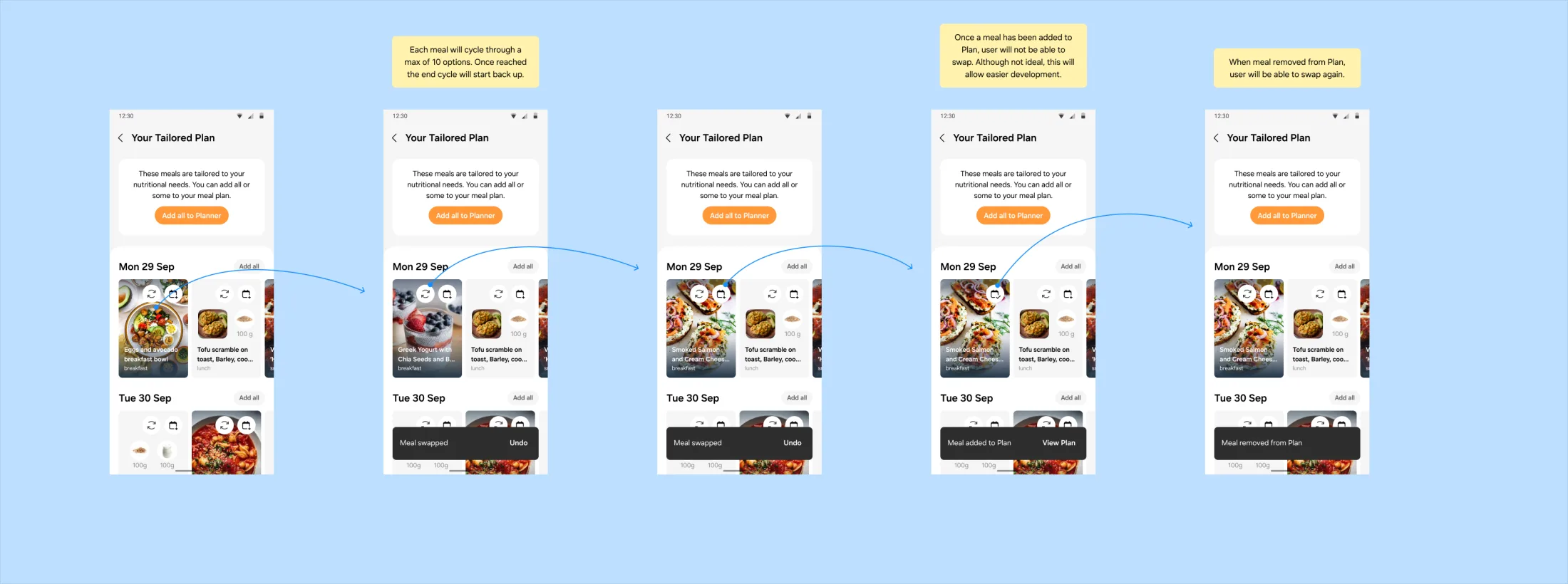
On the board, each meal cycles through a maximum of ten candidates, then starts again. Once a meal is added to the plan it cannot be swapped, not ideal but easier to build, and it can be swapped again if removed. Swapped meals persist while users move in and out of the Tailored Plan, while the app stays active, and always once added to the plan. They reset when the app does.
Sprint 11, swapping in place. The cycle through ten candidates, the swapped state, the meal added to plan and swapped back, with the toasts for each.
Open in Figma ↗ Get password →03Handover
Handing over the swap in place to engineering
Engineering needed every state of the swap, and the wait between candidates, specified before the build. In the Sprint 12 UX and UI section we drew the surface that was released: the new Tailored Plan card with a swap control and an add to plan control, states for one meal or more added to the plan and one or more removed, the toasts for each, and the loading state between swaps. In the animations section we ran the swap through its loading state frame by frame for dev to build the transition as designed. The card set is on the components page.
Sprint 12, the released UX and UI. The section as handed over to engineering.
Open in Figma ↗ Get password →Sprint 12, the swap animation. Three groups of screens, with the prototype linked.
Open in Figma ↗Play the prototype ↗ Get password →Sprint 11, the card set. Recipe and food cards, single and combo, default and added to plan.
Open in Figma ↗ Get password →Cut
- Combo swaps
- Food swaps
- Search for a replacement
- Swap from Home, Explore and the Meal Planner (out of this workstream)
- The paywall on the swap
Released
- A randomised swap in place on the Tailored Plan page
- A cycle of ten candidates per meal
- Swap and add to plan controls on the card
- Added and removed toasts
- Persistence rules
- Free for all users
We recorded each cut on a sprint overview with its reason beside it: dev feedback for the first three, scope for the fourth, the three-row limit for the last.
Over thirteen sprints of scope negotiation with engineering, we reduced the feature to one control on a card. Each cut was recorded on the sprint overview, where the team could see it at the next review. We released the smallest version that answered the Beta feedback, on the Tailored Plan page, which already had the users.
Sources
- Swap meals in the Tailored Plan ↗Figma, sprints 0 to 12 and the design review prototypes
- PrototypesFirst access ↗Kickoff animation ↗Sprint 9 demos ↗Design review variants ↗Swapping a meal ↗
Contact
Get in touch
Product design lead across research, design systems and handover, with coding agents in the loop. Contract, outside IR35, or a permanent lead role.
- Available
- Now
- Location
- London, remote or hybrid, UK and EU
- Right to work
- UK settled status, EU citizen
- RolesLead Product Designer, Principal Product Designer, Design Engineer
- Experience10+ years
- ScopeResearch, design systems, prototyping, handover, QA with agents
- LanguagesEnglish, Italian, Spanish
- Email[email protected]
- LinkedInlinkedin.com/in/dariocodipietro
Professional profile
Copy into your coding agentSkills
- Product design, end to end
- UX and interaction design
- Visual design and motion
- Prototyping in Figma and code
- Design systems at scale
- User research and testing
- A/B testing and analytics
- Strategy and discovery
- AI product design
- Design to code, with agents
- Accessibility, WCAG 2.2 AA
- Leadership and mentoring
Platforms
iOS, Android, responsive web, smart TV and connected devices
Sectors
- AI products
- B2B SaaS
- Consumer apps
- Streaming, media and sport
- Health, wellness and food
- Legal tech
- Telecoms and utilities
Tools
- Figma
- FigJam
- Figma Make
- Claude Design
- Framer
- Axure RP
- Storybook
- Claude Code
- Cursor
- Codex
- MCP
- GitHub
- Linear
- Jira
- Confluence
- Notion
- Miro
- Prolific
- Lyssna
- Maze
- PostHog
- Amplitude