Samsung Food: Recipe AI
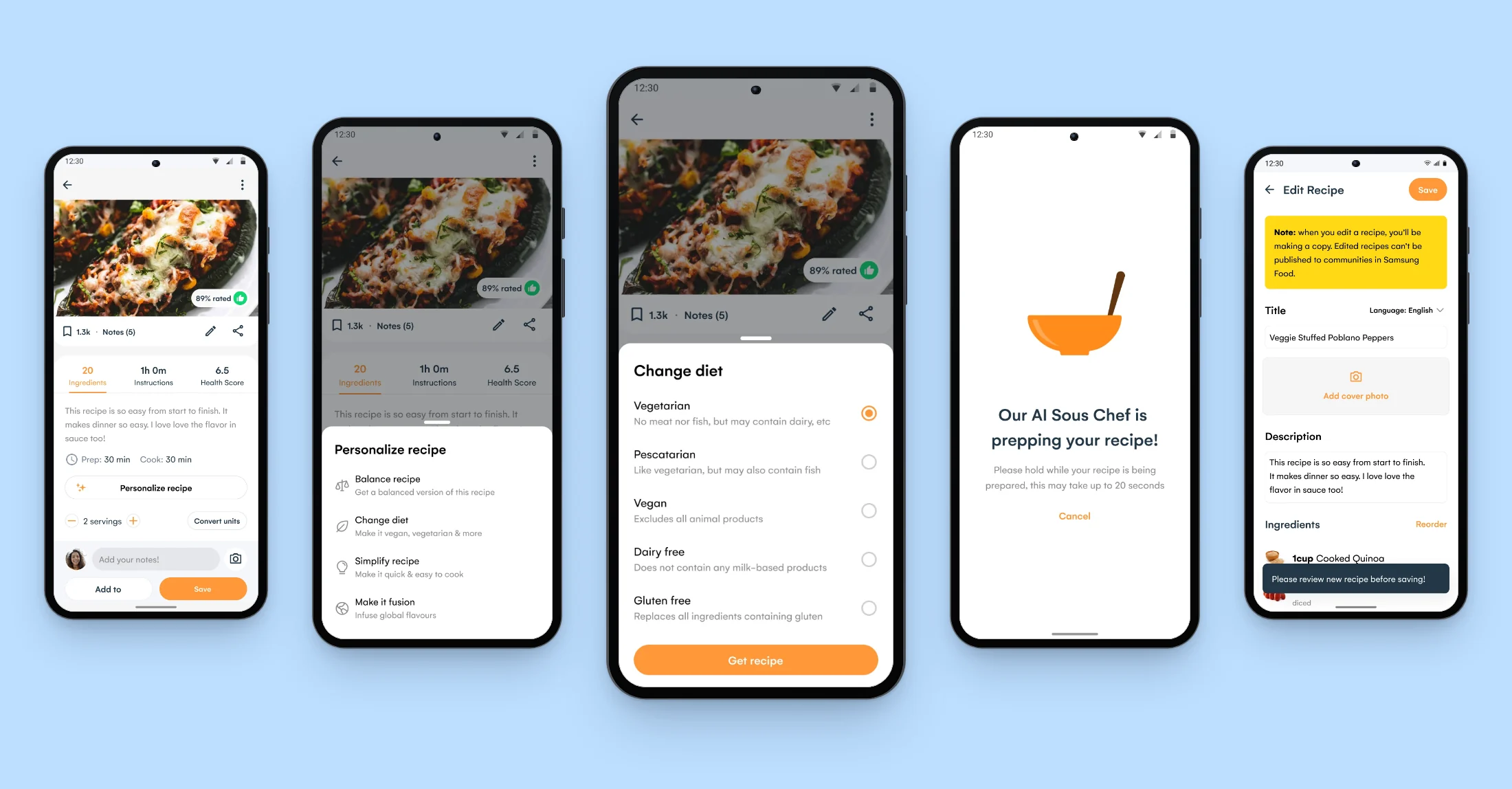
As Lead Product Designer at Samsung Food, I owned Recipe AI from the first concept to the fix after its Samsung Food+ launch, designing generative tweaks that convert any recipe so users could adapt a whole recipe at once.
Outcome
After the willingness-to-pay tests we put recipe conversion first on the AI roadmap. It went live as one of Samsung Food’s headline AI features, in Beta at IFA in September 2023 and in Samsung Food+ on iOS and Android later that year. The new Personalize button opened the AI tweaks, and users mistook it for the free recipe editor. In December 2023 we fixed the button so it opened a choice between the free manual edit and the paid AI tweak.
Context
Ingredient substitutions answered strong demand only in part. Most swaps adapted a recipe to a diet, one ingredient at a time. We learned from user feedback that adapting whole recipes to dietary requirements and restrictions would give users fully personalised alternatives as they browsed for recipes.
We had already started testing a proof of concept internally, which generated and converted recipes from presets or custom prompts with our food graph as context. In Q2 2023 Samsung asked for headline AI features in Samsung Food, and the request fitted those experiments.
Testing which AI features users would pay for
We had explored AI concepts for creators, for users and for inspiration. We needed to know which ones users wanted enough to pay for, and what each would cost to build.
InformWhere the team disagrees or is undecided on direction, research gives it findings to decide on.
ValidateOnce direction is agreed, research checks that the solution holds up with users.
To inform the direction, we took two sets, AI inspiration and Cooking Ideas, to moderated concept tests of willingness to pay. We rated users’ appetite for each concept against its technical cost on a matrix, so we could pick the concept with the strongest demand for the effort it needed.
Willingness to pay, Cooking Ideas. AI tools on the recipe page, from changing the diet to adapting a recipe to the pantry.
Open in Figma ↗Play the prototype ↗ Get password →Willingness to pay, AI inspiration. Search by prompt, and an assistant that plans a course of recipes.
Open in Figma ↗ Get password →Prioritising recipe conversion
Converting recipes tested best and met the least resistance with users, who called it a good use of AI.
On that response we went ahead with Cooking Ideas first, made recipe conversion one of our headline AI features, and took it into design iterations with user feedback and input from engineering.
01Round one
Letting users review a conversion before saving it
A converted recipe could miss the user’s dietary requirements, so users had to check it before it became one of their own recipes. In the first concept, the converted recipe opened in the Recipe Builder with a prompt to review it. As with an ingredient swap, it was saved as the user’s own copy with a card linking to the original, and the original recipe stayed as it was. These screens predate the Samsung Food visual system and use Whisk’s green.
Round one, full feature for Beta users. A Braze message introduces the feature, and the Personalise sheet converts the recipe to vegan.
Open in Figma ↗ Get password →Choosing the label and placement for the tweaks
Users had to find the tweaks on a recipe and understand what they would do. In Q3 2023 we ran a usability test on balance at three strengths, named light tweaks, smart balance and full makeover. Users reached it from a chip labelled Balance or Personalize, with and without the Braze message, and in a third variant from the Health Score tab too.
Personalize became the label on every later board. In the Samsung Food+ design we kept the three strengths, with light tweaks renamed light nudge. We also kept the Health Score entry, so users could reach the tweaks from a recipe’s Health Score as well as from its ingredients.
Usability test, Q3 2023. The flow as tested, with a note for recipes that a balanced version would barely change.
Open in Figma ↗Play the prototype ↗ Get password →02Round two
Converting recipes to the user’s diet
In the Premium survey, a user on a low sodium diet had written that it was hard to figure out whether a recipe could be modified. For Samsung Food+ we designed Change diet, which went live on iOS and Android. When the user had set dietary preferences, the diet was preselected from them, so they did not have to choose it again. Before saving, a prompt asked them to check the result against their dietary requirements. A conversion could take up to 20 seconds, so we designed a waiting screen that told users how long it might take.
Round two, Change diet in Samsung Food+. The Premium journey from October and November 2023, including the state for a recipe that cannot fit the chosen diet.
Open in Figma ↗Play the prototype ↗ Get password →Releasing in Beta, then leading Basic users to Samsung Food+
Basic, Beta, Freemium and Premium users each needed their own version of the tweaks. For the IFA launch in September 2023, only Beta users on Android saw the four tweaks, under a Beta tag. The four were balance, make it vegan, simplify and create a fusion recipe.
At the Samsung Food+ launch, balance was open to Premium users. For Basic users, its sheet had a Plus tag and a Get Samsung Food+ button that led to the upgrade. We drew a three-shot trial for Basic users and parked it for a later release.
Beta, at IFA. The Personalize sheet with its Beta tag.
Open in Figma ↗ Get password →Basic, at the Samsung Food+ launch. The balance sheet with its Plus tag.
Open in Figma ↗ Get password →03After launch
Separating the free editor from the paid tweak
After the Samsung Food+ launch, users complained that they had lost the free recipe editor. They had most likely taken the new Personalize button for it.
In December we made the button open a choice between editing the recipe manually, which stays free for every user, and personalising it with AI, tagged Plus or Beta. We had drawn the same choice as an option in the August design jam, where it was questioned as too complex to build.
Hot fix, December 2023. The manual edit leads to the Recipe Builder, and the AI tweak to the Samsung Food+ paywall.
Open in Figma ↗ Get password →What was parked, and what was released
Parked
- Prompt-generated recipes and creator tools
- The AI inspiration concepts
- A three-shot trial for Basic users
Released
- Four tweaks in Beta at IFA, on Android
- The tweaks in Samsung Food+, on iOS and Android
- The diet preselected from preferences
- A review before saving the converted copy
- A choice between the free editor and the AI tweak
We parked the AI inspiration concepts, which tested below recipe conversion.
When this went live, generative AI was new, and the users who tested it were happy with the conversions. Later on the roadmap, the tweaks went to every user, and creators got their own tools in the Recipe Builder. Now that many people expect AI output to be low quality, I would test the converted recipes as thoroughly as the journey, and add notes from people who cooked them.
Sources
- AI ideas ↗Figma, Q2 2023, the concepts and the willingness-to-pay sets
- Appetite against technical costMiro, 2023
- Recipe AI ↗Figma, from Beta to the December 2023 hot fix
- Balance usability test ↗Figma prototype, Q3 2023
- Change diet ↗Figma prototype, October and November 2023
Contact
Get in touch
Product design lead across research, design systems and handover, with coding agents in the loop. Contract, outside IR35, or a permanent lead role.
- Available
- Now
- Location
- London, remote or hybrid, UK and EU
- Right to work
- UK settled status, EU citizen
- RolesLead Product Designer, Principal Product Designer, Design Engineer
- Experience10+ years
- ScopeResearch, design systems, prototyping, handover, QA with agents
- LanguagesEnglish, Italian, Spanish
- Email[email protected]
- LinkedInlinkedin.com/in/dariocodipietro
Professional profile
Copy into your coding agentSkills
- Product design, end to end
- UX and interaction design
- Visual design and motion
- Prototyping in Figma and code
- Design systems at scale
- User research and testing
- A/B testing and analytics
- Strategy and discovery
- AI product design
- Design to code, with agents
- Accessibility, WCAG 2.2 AA
- Leadership and mentoring
Platforms
iOS, Android, responsive web, smart TV and connected devices
Sectors
- AI products
- B2B SaaS
- Consumer apps
- Streaming, media and sport
- Health, wellness and food
- Legal tech
- Telecoms and utilities
Tools
- Figma
- FigJam
- Figma Make
- Claude Design
- Framer
- Axure RP
- Storybook
- Claude Code
- Cursor
- Codex
- MCP
- GitHub
- Linear
- Jira
- Confluence
- Notion
- Miro
- Prolific
- Lyssna
- Maze
- PostHog
- Amplitude