Samsung Food: Ingredient Substitutions
As Lead Product Designer at Samsung Food, I designed ingredient substitutions, the most requested feature in the Premium research, for Basic, Beta and Premium users at once, to let them adapt any recipe to their diet and preferences.
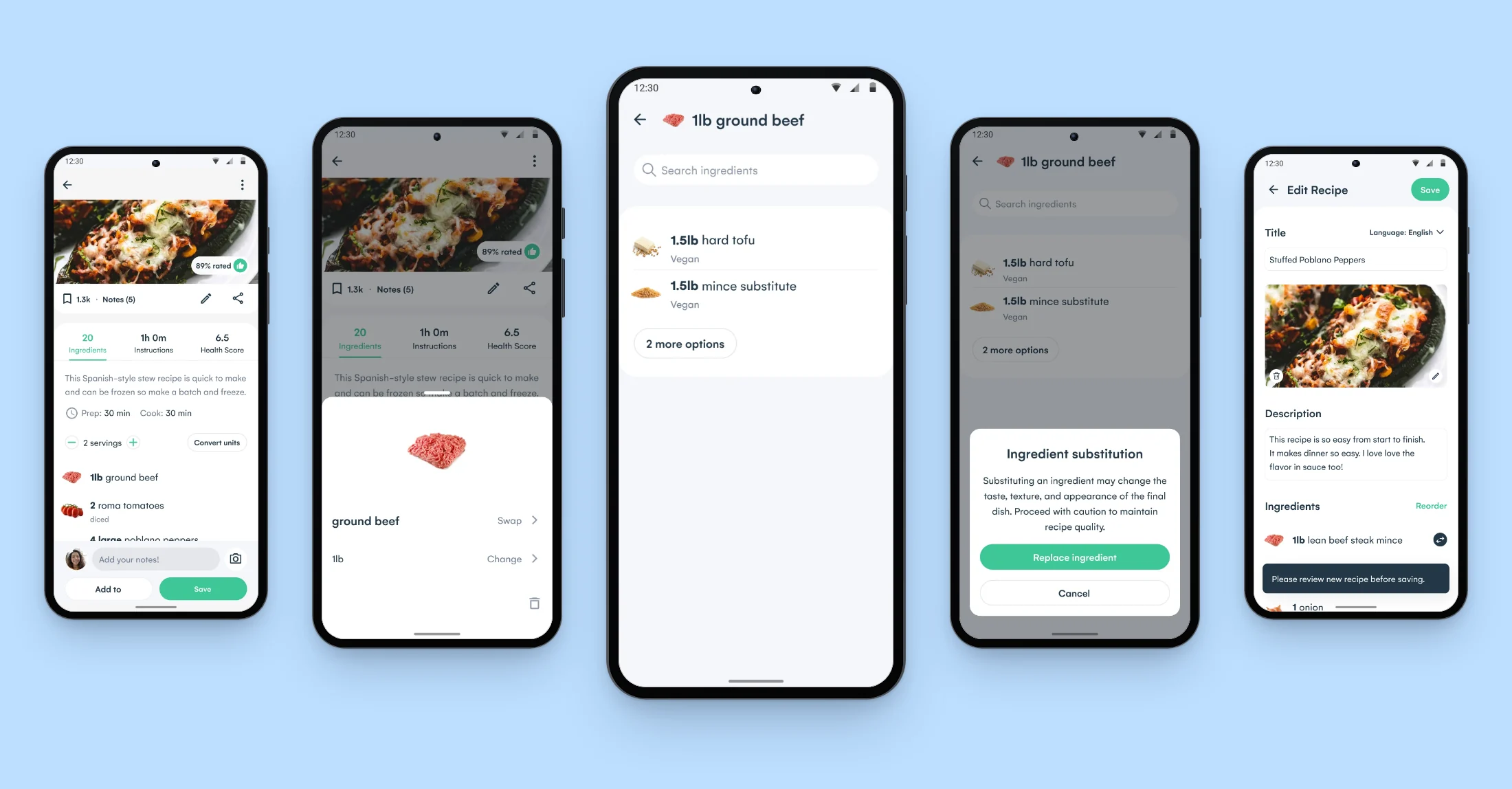
Outcome
The swap reached every user in release 4.78 on 26 June 2023. The diet filter followed behind its feature flags as the Premium layer, in what became Samsung Food+. It put the matches for the user’s diet first in the list of replacements. Most swaps were made to adapt a recipe to a diet. The usage figures are not public.
Context
Users could save, plan and shop a recipe but had no way to edit its ingredients. Of the recipe edits logged in Amplitude in November 2022, 30% changed an ingredient. Users with a diet or a food sensitivity had no way to adapt a recipe, and in the Premium survey one user wrote: “My husband is sensitive to alliums and I need a low sodium diet. It’s hard to figure out if I can modify a recipe or not.”
The brief was to suggest substitutes by diet and preference, for Basic and Premium users, before the Premium v1 date.
Turning a swap into a recipe users can keep
Over three iterations and a first user test in December 2022, the team had established that users could find and complete a swap. I took the workstream over from Iteration 4, in April 2023, and designed the swap as one journey, from the ingredient row to a saved copy.
User Test v1, December 2022. 95% of testers worked out how to swap an ingredient, and the team recommended going ahead with the implementation.
Open in Figma ↗ Get password →01Round one
Letting users swap an ingredient on any recipe
In Iteration 4, the swap sheet opened from an ingredient row. Dialogs asked whether to save the edit and whether to update the meal plan, since the recipe could already be in it. Each iteration is one Figma page, reviewed with the PM and engineering, and the next one is built on the outcome of that review.
Round one, Iteration 4. The swap as I first drew it, in April 2023, from the recipe page through the swap sheet and confirmation to the save and meal plan dialogs.
Open in Figma ↗Play the prototype ↗ Get password →Testing what users expected to be free
The team had yet to decide which part of the swap belonged in Basic and which in Premium.
InformWhere the team disagrees or is undecided on direction, research gives it findings to decide on.
ValidateOnce direction is agreed, research checks that the solution holds up with users.
We ran concept tests with users to inform that decision. Users expected a list of alternatives to be free, and vegan testers asked for options outside their diet to be removed.
Keeping the swap free, with the diet filter in Samsung Food+
The PM settled the split between the tiers on what users expected to be free.
We kept the swap in Basic and made the diet filter the Premium layer.
Removing the other options outright took control away from users, so for Premium the list leads with the matches for the user’s diet and keeps the rest behind a count that expands.
Iteration 9, replacement settings. The Premium setting, on by default, beside the swap list with it on and off.
Open in Figma ↗ Get password →02Round two
Handling edge cases and saving several swaps at once
A replacement can be two items, such as chia seeds and water for an egg. Both quantities go on one line, which fits the longest names without the text jumping. When an ingredient has no replacement, the list falls back to search and logs the gap for the food graph team.
The recipe page has no save state, and a lighter edit screen there meant a second editor to build. After engineering review, we moved every edit into the Recipe Builder instead, and the swap sheet went into the Builder as well, so several ingredients can be swapped before one save.
Iteration 9, swap list states. The filtered and full lists, active yeast with no replacement, and chia seeds with water on one line for two eggs.
Open in Figma ↗ Get password →Iteration 9, save recipe. The review prompt, the save dialogs for a first edit and for an existing copy, the shopping list and meal plan updates, and the original recipe linking to the edit.
Open in Figma ↗ Get password →Making ingredient rows read as tappable without tooltips
Growth had retired tooltips, so users had to find the swap without one. In design review, the team asked for rows that read as tappable without help text. In Iteration 6 I prepared three ways into the swap and ran them on Maze in May 2023: a line of help text with a one-time tip, the tip with a subtle icon on every row, and a chevron on every row. Testers found the tap in all three, so we took the lightest forward and added a Braze slide-up at launch telling users they could tap to swap ingredients.
Iteration 6, variants for testing. The three prototype variants of the way into the swap, below the options for showing a two-item replacement.
Open in Figma ↗Play the prototype ↗ Get password →03Handoff
Releasing the swap to every user ahead of the diet filter
I handed over Iteration 9 with the released journeys and their states. We put the diet filter behind feature flags for Beta and Premium users, so the swap could reach every user first. In the released flow, tapping anywhere on an ingredient row opened the item sheet, and after the swap the recipe opened in the Recipe Builder to save as the user’s own copy.
Iteration 9, basic replacement. The released flow, with the caveat that a substitute can change the taste, texture and appearance of the dish.
Open in Figma ↗Play the prototype ↗ Get password →What was cut, and what was released
Explored
- Help text and a one-time tip on each row
- A subtle swap icon on every row
- A lighter edit screen on the recipe page
- Removing options outside the user’s diet
Released
- A swap on every ingredient row
- Replacement lists, two-item replacements included
- Search when nothing matches, with the gap logged
- One save path through the Recipe Builder
- The diet-first list and setting for Premium
- A Braze slide-up at launch
We made each cut after a test result or an engineering review.
The technical limits of the time meant months of work for a single-ingredient swap. Today I would build substitutions and whole-recipe conversion on generative AI from the start. That became the focus of Recipe AI.
Sources
- Ingredient management, simple substitutions ↗Figma, iterations 4 to 9 and the release states
- Tap variants testMaze, May 2023
- Recipe editsAmplitude, November 2022
- PrototypesIteration 4 ↗Iteration 6 variants ↗Iteration 9, the released flow ↗
Contact
Get in touch
Product design lead across research, design systems and handover, with coding agents in the loop. Contract, outside IR35, or a permanent lead role.
- Available
- Now
- Location
- London, remote or hybrid, UK and EU
- Right to work
- UK settled status, EU citizen
- RolesLead Product Designer, Principal Product Designer, Design Engineer
- Experience10+ years
- ScopeResearch, design systems, prototyping, handover, QA with agents
- LanguagesEnglish, Italian, Spanish
- Email[email protected]
- LinkedInlinkedin.com/in/dariocodipietro
Professional profile
Copy into your coding agentSkills
- Product design, end to end
- UX and interaction design
- Visual design and motion
- Prototyping in Figma and code
- Design systems at scale
- User research and testing
- A/B testing and analytics
- Strategy and discovery
- AI product design
- Design to code, with agents
- Accessibility, WCAG 2.2 AA
- Leadership and mentoring
Platforms
iOS, Android, responsive web, smart TV and connected devices
Sectors
- AI products
- B2B SaaS
- Consumer apps
- Streaming, media and sport
- Health, wellness and food
- Legal tech
- Telecoms and utilities
Tools
- Figma
- FigJam
- Figma Make
- Claude Design
- Framer
- Axure RP
- Storybook
- Claude Code
- Cursor
- Codex
- MCP
- GitHub
- Linear
- Jira
- Confluence
- Notion
- Miro
- Prolific
- Lyssna
- Maze
- PostHog
- Amplitude