Univision: Sports streaming service
As Senior UX and UI Designer at Massive Interactive, I designed the UX for a direct-to-consumer football service on web, native apps and Chromecast, with which Univision planned to test a subscription proposition apart from its UDN channel.
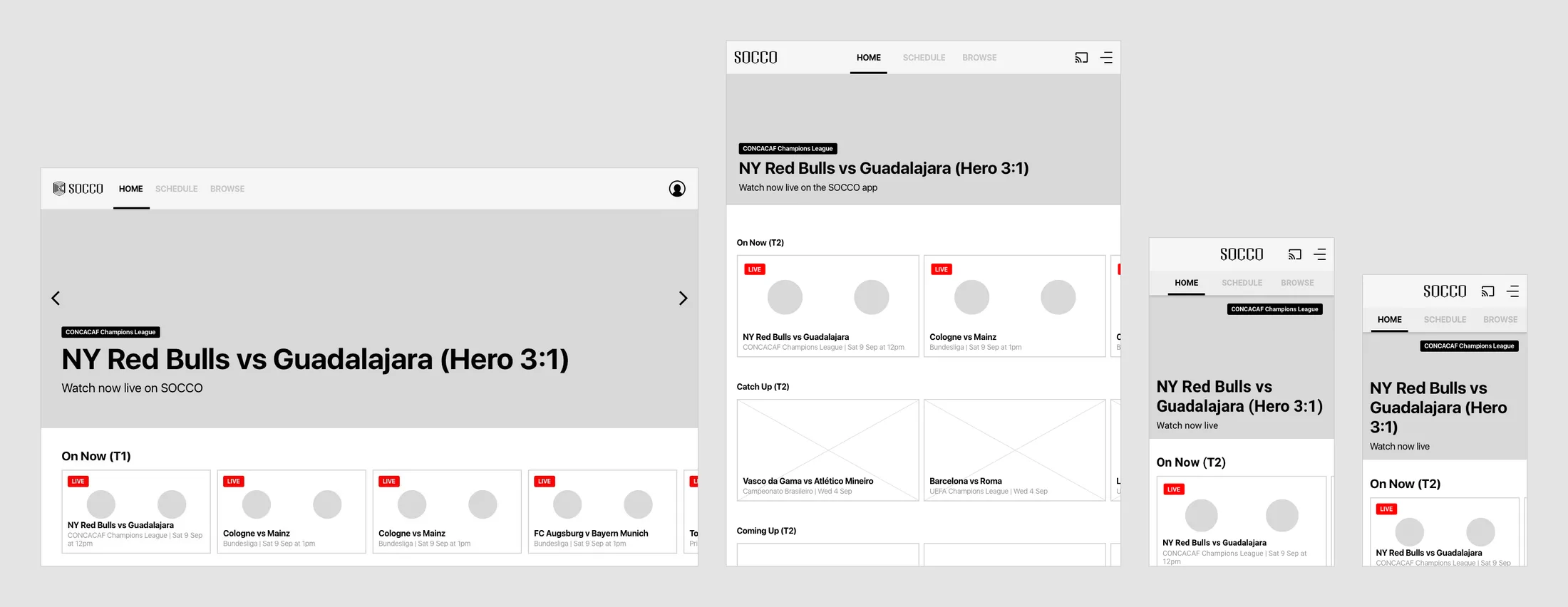
Outcome
Labelling each wireframe block with the AXIS platform component it uses became standard in Massive’s UX specs for other clients. The service itself was never released. After the UI was delivered, the project folded over commercial agreements between Univision and US TV and cable providers.
Context
Univision’s networks mainly serve Hispanic and Latino audiences in the US and Mexico. The new service would carry mostly football, live and on demand, from the main leagues of the Americas and Europe. It would run on AXIS, Massive’s VOD platform, which let broadcasters release a full VOD product in a short time. The service was to be built only from out-of-the-box AXIS modules. Its working name, Socco, predates my start.
The scope covered responsive web for desktop, tablet and phone, native apps for iPhone, iPad and Android phones and tablets, and a Chromecast receiver. My part was the UX, from April to June 2018. I drew the wireframes in Sketch and specified them in Axure, with references throughout to the AXIS demo and to AXIS’s own wireframes. I worked closely with the client team in the US to deliver as much of the expected experience as AXIS allowed, and to agree alternatives where it fell short of their business requirements. Designs were reviewed at Massive and with Univision’s business stakeholders.
Organising leagues by confederation and filling the winter break
The service would carry leagues from three regions in P1, with more under each country in P2. The league taxonomy follows the confederations: UEFA for Europe, CONCACAF for North and Central America and CONMEBOL for South America. In P1 a region home page sits above its league pages. In P2 a country page sits between them, with more leagues under each country, among them second divisions and Brazil’s state championships. The Leagues menu lists regions first, then countries A to Z, then regional tournaments.
There is little content over the Christmas and New Year break, and the service needed enough to watch through it. I mapped what the service would carry at each stage of the season, from launch through mid-season to that break, when a two-week VOD cut-off left three competitions to watch. To fill the break, I recommended extending the VOD window to four weeks for major competitions and keeping two for small tournaments.
Leagues IA, P2. Region, country and league home pages, marked L1 to L3. The world, Asian, African and Oceanian confederations stay greyed out in both phases.
Open in Axure ↗ Get password →Content map by stage of the season. The recommendation is in a note under the break. Below the note, the last map shows the break again with nine competitions to watch.
Open in Axure ↗ Get password →01Browse
Mapping every page to AXIS components for the build
Home, Schedule, Leagues, Region and League pages come in all seven layouts, and I labelled each block on the wireframe with the AXIS component it uses: Hero 3:1, T1 and T2 tile rows, S1 category rows, ED2 and ED4 editorial blocks, the 4.0 list. The annotations point to the same modules in the AXIS demo.
On desktop, an annotation column beside each page holds its rules and references. Among them, the navigation bar hides on scroll down and returns on scroll up, and the 3:1 hero takes playable content from any category.
Home, desktop web. In note 7 I suggested an order for the home rows, from What’s On and Live TV to links to every league and region. The order could be changed in presentation, as could each row’s type.
Open in Axure ↗ Get password →Visitors on phones and tablets can browse the same content on the web as on desktop, in T2 rows, and need the native app to play video.
Home, mobile web. The hero reads “Watch now live on the SOCCO app”. In P1 the tabs show only on the top-level pages.
Open in Axure ↗ Get password →Fans need to see from a game’s tile, at any point in the day, whether they can watch it yet. Every tile follows one set of states, which I specified in the IA pages.
Tile states, P1. A game tile shows Live Soon ten minutes before kick-off, then moves to Live and to catch-up. In P2, tiles also show the kick-off day in relative terms: next week, next Wednesday, tomorrow, today.
Open in Axure ↗ Get password →Meeting Univision’s requirements within out-of-the-box AXIS
Several of Univision’s requirements needed more than the out-of-the-box AXIS modules the service was limited to. For each of these I used the nearest AXIS pattern and said so on the page, or held the requirement for P2.
The out-of-the-box detail page could not play video, so every detail page took an image background and Watch opened NeuLion’s full-screen player. Out-of-the-box T1 tiles were too small on phones and tablets to show both text labels, and I recommended T2 rows for the mobile layouts. Search and device management in the account were held for P2.
Item detail, live game. The detail page comes in five variants: live game, coming-up game, VOD game, VOD clip and TV channel. The references are pages of the AXIS demo.
Open in Axure ↗ Get password →02Playback
Matching player controls to each type of content
Viewers need different controls for a live game, a VOD game, a clip and a TV channel. NeuLion was to supply the player, and I specified the controls for each type of content, on iOS as a skin of NeuLion’s own. Live games get a 30-second skip back and a Back to Live button, active whenever the viewer is behind live. VOD games and clips add a 30-second skip forward and the full length of the event. Channels, whose streams carry little metadata, get play and pause only.
Live playback, iPhone. Captions and audio use NeuLion’s native table component to switch subtitles and audio tracks. Clicking the screen opens the skip-back state in the prototype.
Open in Axure ↗ Get password →Getting games onto the TV with Chromecast
Fans watch football on the TV, and in this scope they would cast a game to Chromecast from the apps, or from the web player where available. For casting from the apps, I specified the sender flow on Android and on iOS in ten steps each, from the introduction to the extended player, against Google’s Cast design checklist and the AXIS Chromecast spec. Each step is paired with the screen the TV shows at that moment. Lock screen controls are Android only. The receiver was out-of-the-box AXIS, specified in seven states from loading to playing. Both flows click through as a prototype in Axure.
Casting, Android above and iOS below. Five of the ten steps on each platform are shown. The device list and the casting dialog follow each platform’s own patterns.
03Handover
Turning signed-out visitors into customers
For the test of whether fans would sign up, signed-out visitors had to see what the service offered and, on the web, be able to join. Signed out, the web opens on a landing page and the apps on an onboarding page. The detail pages for live, coming-up and VOD games have signed-out versions. Sign-up on the web runs from choosing a plan to creating the account, payment and confirmation.
In the apps, My Account redirects to the account on the web. On iOS that redirect was pending a review between Univision and Apple before implementation, to avoid an App Store rejection.
Signed out, mobile web. Every block ends on Join the Club.
Open in Axure ↗ Get password →Signed out, iPhone app. The same blocks, each ending on Sign In.
Open in Axure ↗ Get password →What was deferred, and what was handed over
Deferred or ruled out
- Search
- Country home pages
- Relative kick-off days on tiles
- Device management in the account
- Video inside the detail page
- T1 tiles on phones
- Cast controls on the iOS lock screen
Handed over
- Home, Schedule, Leagues, Region and League pages
- Detail pages for five kinds of content
- Playback for live games, VOD, clips and channels
- Chromecast sender flows on Android and iOS, and the receiver
- Landing page, onboarding, sign-in and sign-up
- The account, on the web and from the apps
- League taxonomy, tile states and content map
Search, country pages, relative kick-off days and device management were held for P2, and the rest needed more than out-of-the-box AXIS or iOS allowed.
The UX spec was meant as the basis for UI and production. Keeping to AXIS modules, with alternatives where they fell short, was also the brief for the WWE Network apps, which began in May 2018. BritBox UK had the same brief.
Sources
- Univision UX spec ↗Axure, April to June 2018Get password →
- Portfolio slide2020
Contact
Get in touch
Product design lead across research, design systems and handover, with coding agents in the loop. Contract, outside IR35, or a permanent lead role.
- Available
- Now
- Location
- London, remote or hybrid, UK and EU
- Right to work
- UK settled status, EU citizen
- RolesLead Product Designer, Principal Product Designer, Design Engineer
- Experience10+ years
- ScopeResearch, design systems, prototyping, handover, QA with agents
- LanguagesEnglish, Italian, Spanish
- Email[email protected]
- LinkedInlinkedin.com/in/dariocodipietro
Professional profile
Copy into your coding agentSkills
- Product design, end to end
- UX and interaction design
- Visual design and motion
- Prototyping in Figma and code
- Design systems at scale
- User research and testing
- A/B testing and analytics
- Strategy and discovery
- AI product design
- Design to code, with agents
- Accessibility, WCAG 2.2 AA
- Leadership and mentoring
Platforms
iOS, Android, responsive web, smart TV and connected devices
Sectors
- AI products
- B2B SaaS
- Consumer apps
- Streaming, media and sport
- Health, wellness and food
- Legal tech
- Telecoms and utilities
Tools
- Figma
- FigJam
- Figma Make
- Claude Design
- Framer
- Axure RP
- Storybook
- Claude Code
- Cursor
- Codex
- MCP
- GitHub
- Linear
- Jira
- Confluence
- Notion
- Miro
- Prolific
- Lyssna
- Maze
- PostHog
- Amplitude