GitLaw: Figma to code
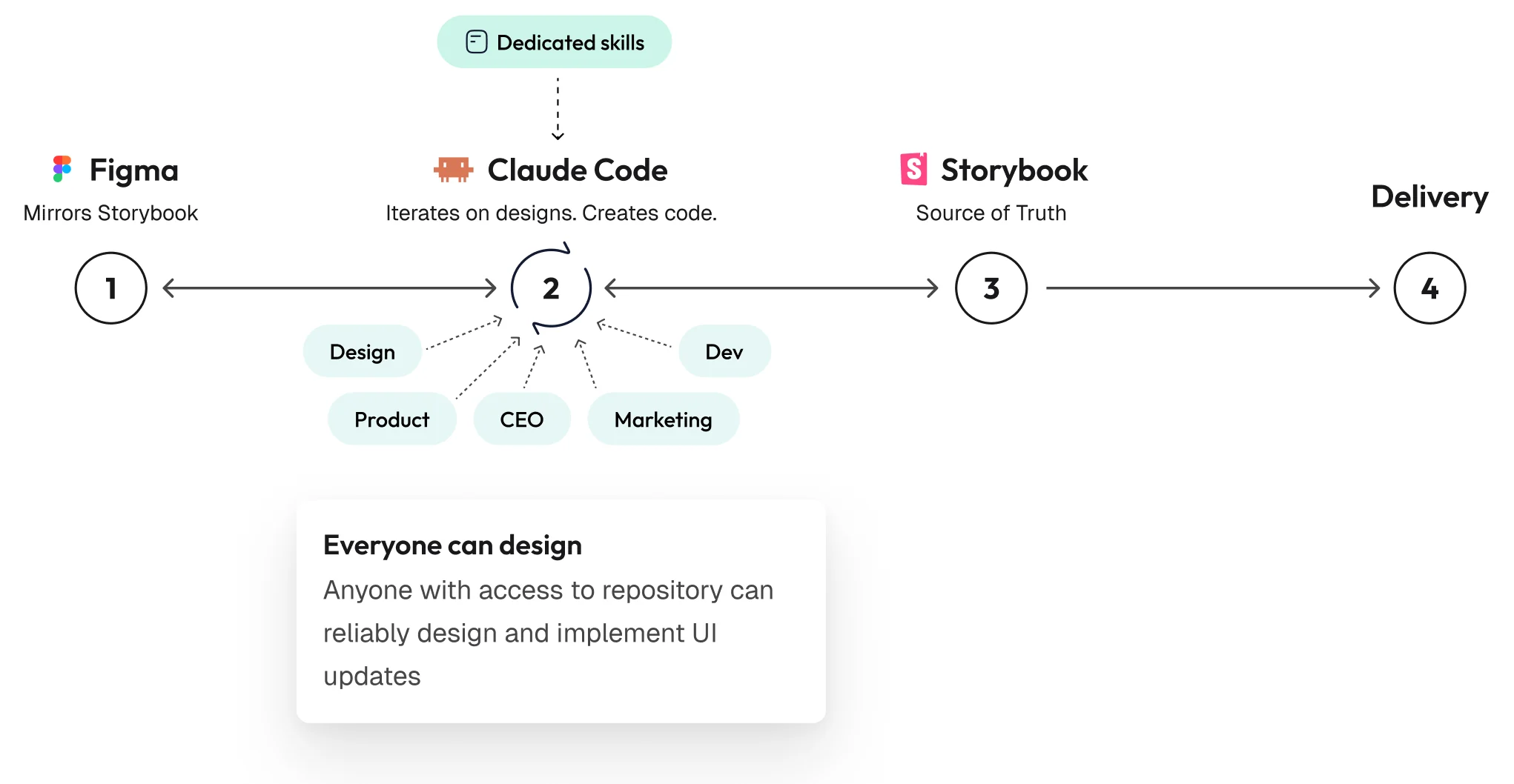
As Product Design Lead at GitLaw, I helped automate the path between Figma and the front-end repo in both directions, with Storybook in the repo as the design system both sides agree on, to speed up design delivery and let anyone with access to the repository make design changes in the product.
Outcome
Engineers took the Figma-to-code loop over and wrote it into their own documentation, and every pull request now gets a Storybook URL. In a separate prototyping repo, 31 prototypes were built in five weeks, and the CEO opened 58 pull requests. The design system was harmonised between code and Figma, with both using the same components and tokens, and the team adopted a consistent process for generating code from Figma and iterating on Figma from code. Designers got a much faster design-to-implementation cycle and started opening their own pull requests. Figma generation stayed relatively slow and never fully reliable, the prototyping repo was valuable mainly for ideation because it was disconnected from Storybook, and the Figma library still had to be aligned with Storybook by hand.
Context
Development at GitLaw had accelerated with agentic workflows, while design was still a manual, iterative process that ended in a handoff. The handoff had two underlying problems that compounded each other.
Design and code drifting apart
Figma and the repo were separate systems, each holding its own copy of the design system, and over time the copies drifted. Thirteen semantic colours existed only in Figma. Nothing existed that both sides could open and look at together, so a built surface was compared to a Figma frame by eye, in review, after it had been built. When it did not match it was often rebuilt, and the work went back to design iteration, which could run to ten rounds or more.
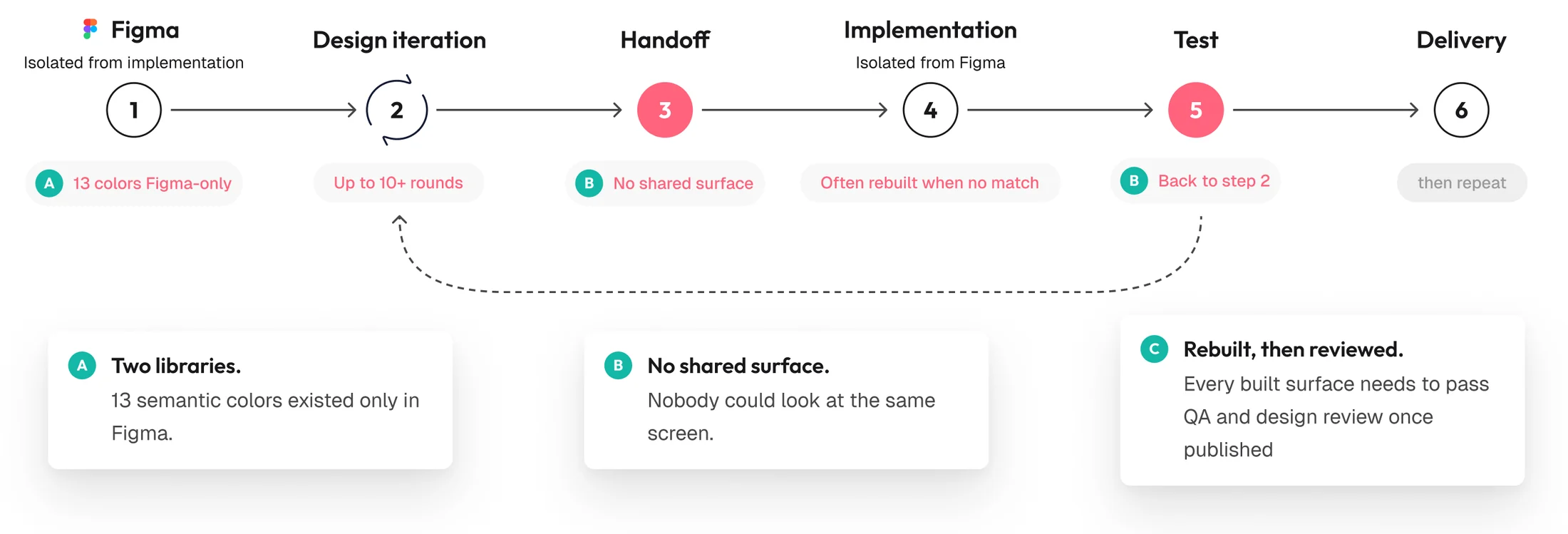
The loop before. Six steps from Figma to delivery, with test returning to design iteration, and a published surface that still has to clear QA and design review at the end.
Agents without context
Figma MCP and the out-of-the-box skills had already been released, so pointing an agent at the file was the obvious first step. Without context it hallucinated in both directions, putting shapes, hex values and hand-rolled positioning into Figma, and raw hex and Figma layer names into code with tokens and variables missing. Iterating made it worse, because each round started from the previous round’s mistakes.
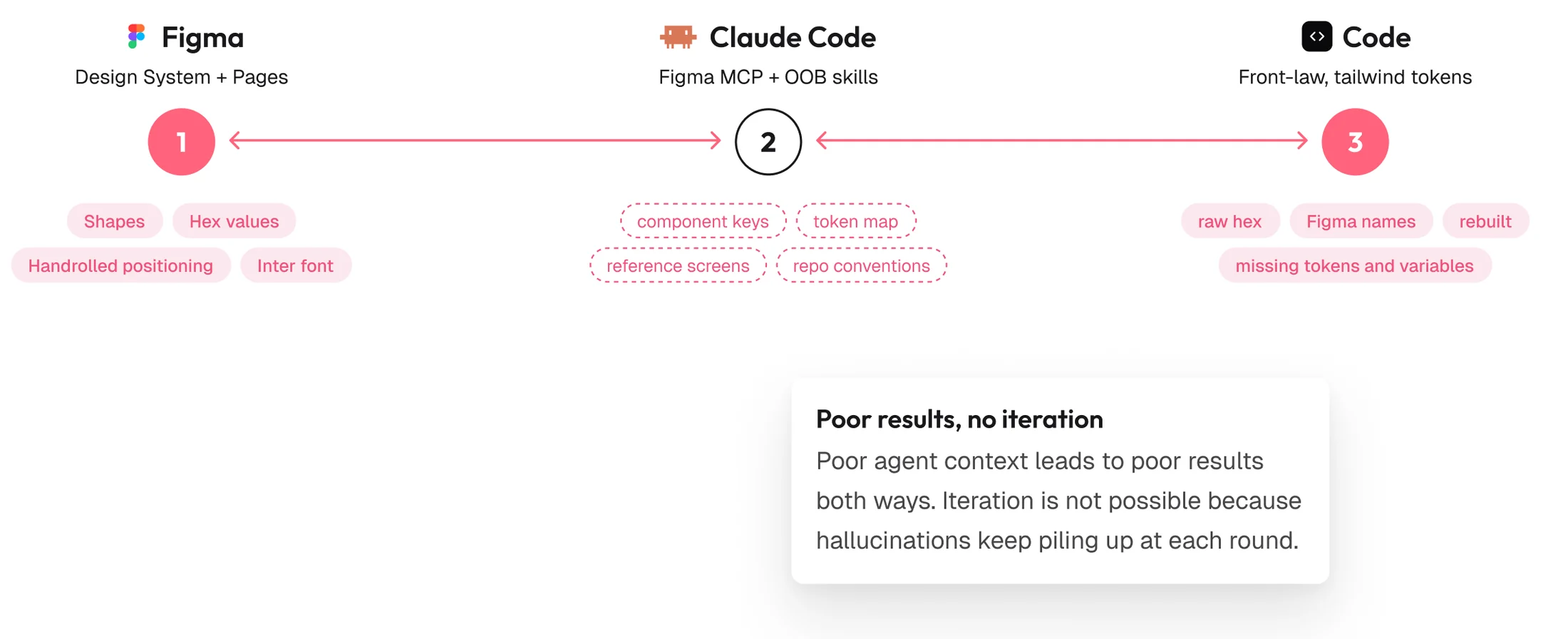
Agents in both directions, without context. The dashed tags in the middle list the context the agent did not have.
Making Storybook the source of truth
To end the drift and give agents the context they were missing, we made Storybook the canonical design system, kept it in the product repo and set the Figma library to mirror it. We then wrote the skills that let an agent read the repo’s own conventions and work between Storybook and Figma in either direction.
The diagram at the top of this page shows the setup, with design, product, the CEO, marketing and dev all working in Claude Code at the middle step. For the team, opening it to more people mattered more than the speed. Anyone with access to the repository could put a UI change into the product, including product, marketing and the CEO as well as the two disciplines that already had the tools.
01Proof of concept
Proving the approach in a sandbox
To test the approach before using it in the product, I built a standalone sandbox outside it. Agents rebuilt the entire design system in Storybook, with each Figma component as a story that was checked against a Figma screenshot before it was accepted. I then tested the result by prototyping full pages in Claude Code.
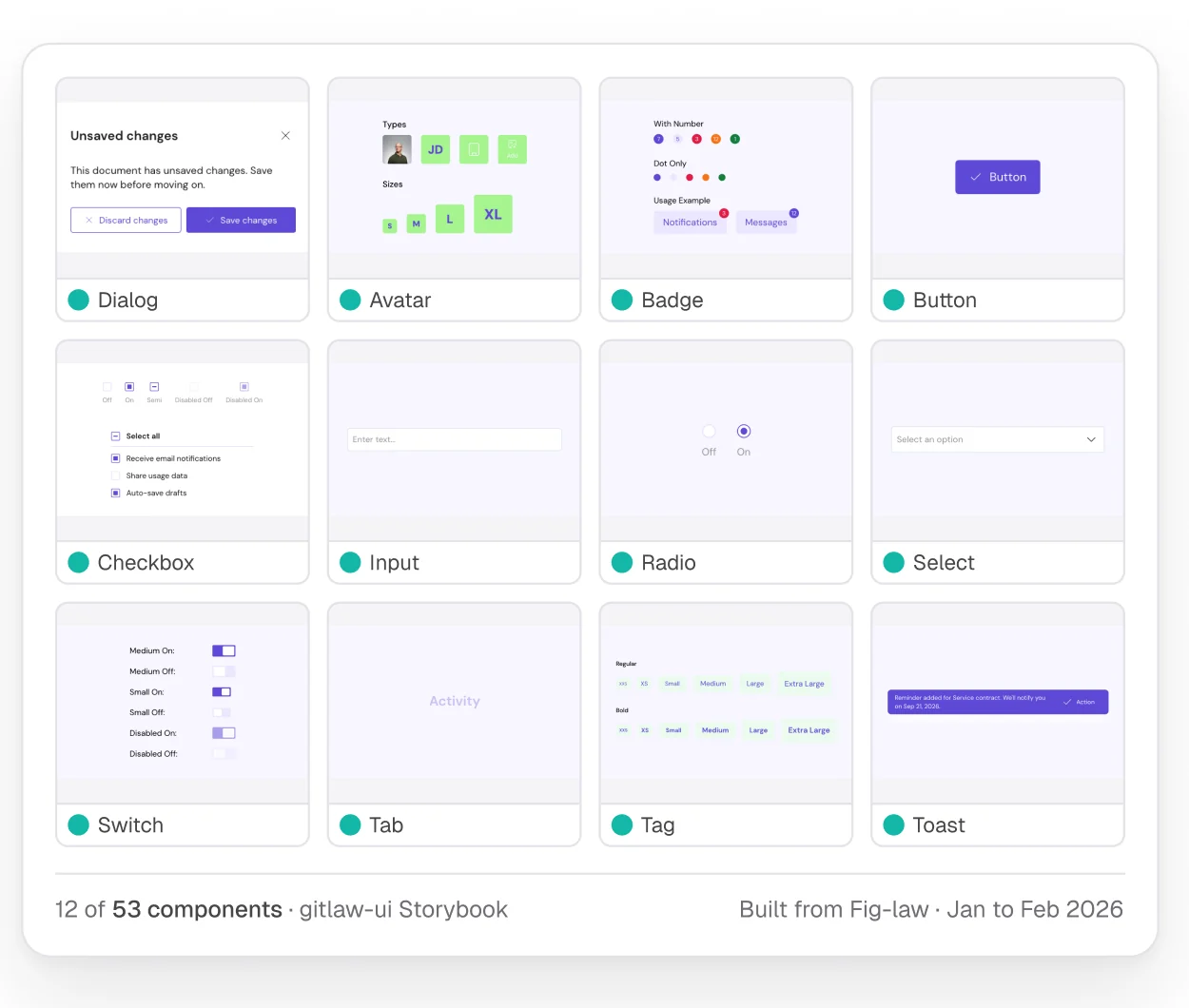
The sandbox Storybook. Twelve of the fifty-three components, built from Fig-law, GitLaw’s Figma library, between January and February.
02Into the product
Telling agents what the product repo already holds
With the approach proved in the sandbox, the method had to run inside the product, where an agent with no record of what already existed would guess at the repo and rebuild components that were already there. Agents ran the same method inside the product repo, and gave its Storybook a section for the design side: primitives, blocks, foundations and styles.
To make the method repeatable, the agent reads a playbook at the start of every session. It lists what exists and what already has a story, so each session starts from the real state of the repo. On day one, 18 of 54 primitives were covered, and the first commit added 17 stories.
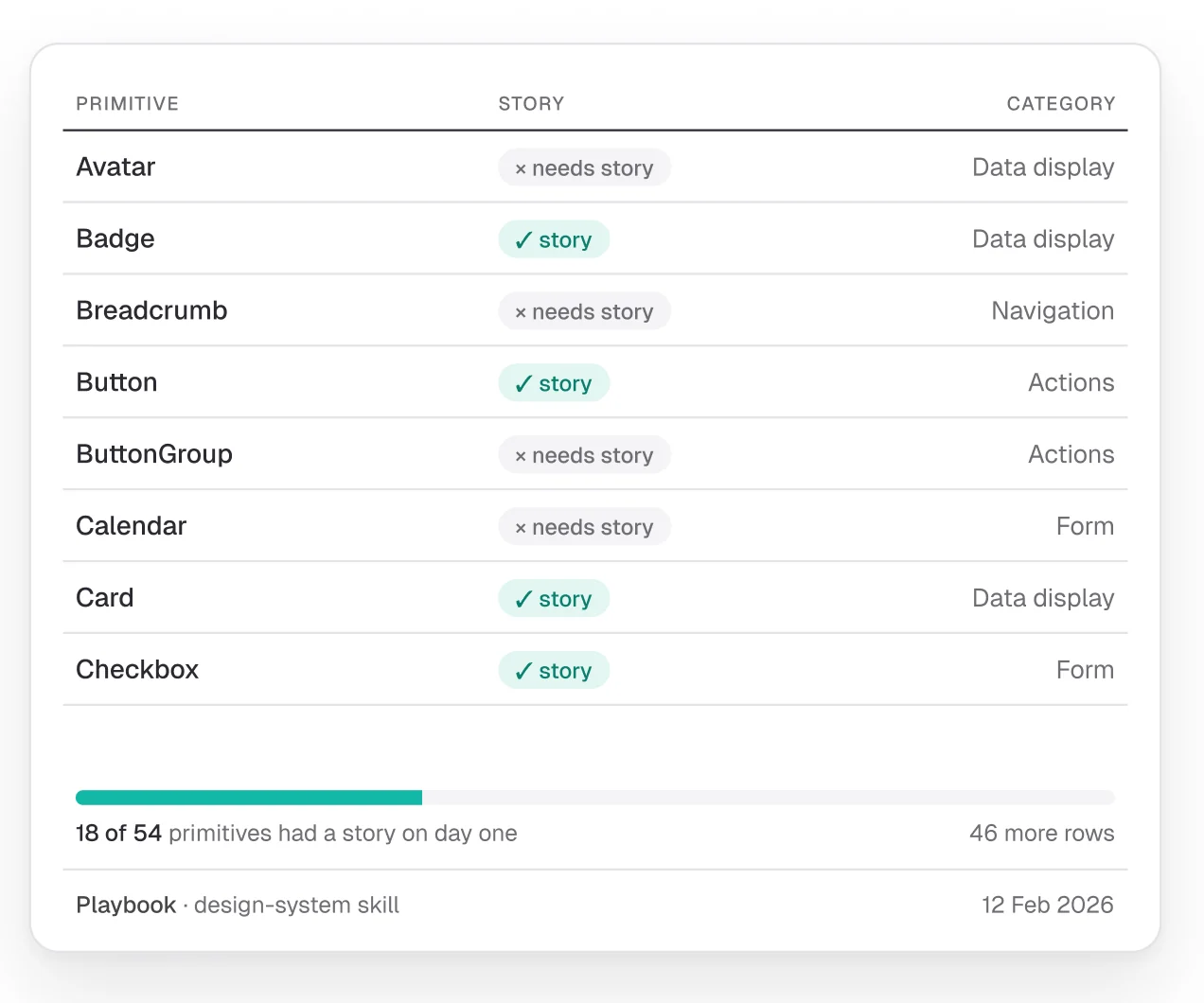
The playbook. Every primitive marked story or needs story, with its category, and the day one progress bar beneath.
03Engineering adoption
Making built components match the design with a visual feedback loop
A built surface had been checked against Figma by eye, in review, after it was built. Engineers picked the Storybook work up and formalised it as bricks, small components with a clear contract and a story for each. In their own documentation of the loop, they wrote that bricks exist to enable a visual feedback loop and called it the most effective way to build a front end that looks correct. Edit the brick, write the story, screenshot it, compare the screenshot to the design, and go back to the start if it does not match. Every pull request now gets a Storybook URL as a comment.
The loop works because a brick has no server dependencies and renders in Storybook with props and an IntlProvider, so a screenshot is cheap enough to take on every round.
From then on, the loop that began as a design initiative was part of engineering’s own documentation.
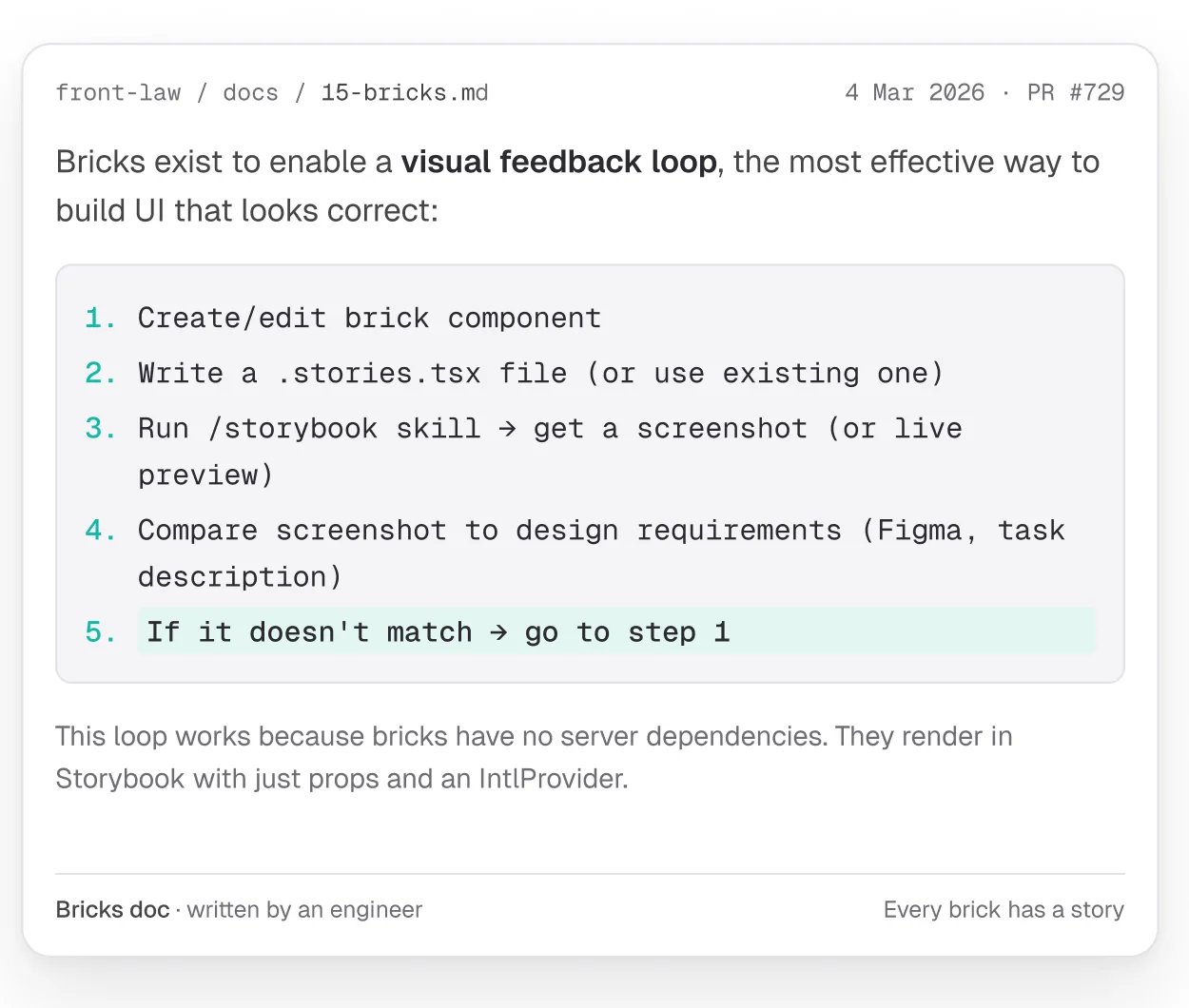
The bricks document. 15-bricks.md, written by an engineer in the front-end repo’s own docs.
04Two-way pipeline
Building pages from Figma with production components
Without context, agents had turned Figma files into code with raw hex and Figma layer names, and with tokens and variables missing. To make Figma to code reliable, we put the skills in the repo. With them, an agent matches repo components against a Figma file someone shares with it, and the design can then be iterated in code until it matches what was asked for. The agent uses the same Storybook components that go to production.
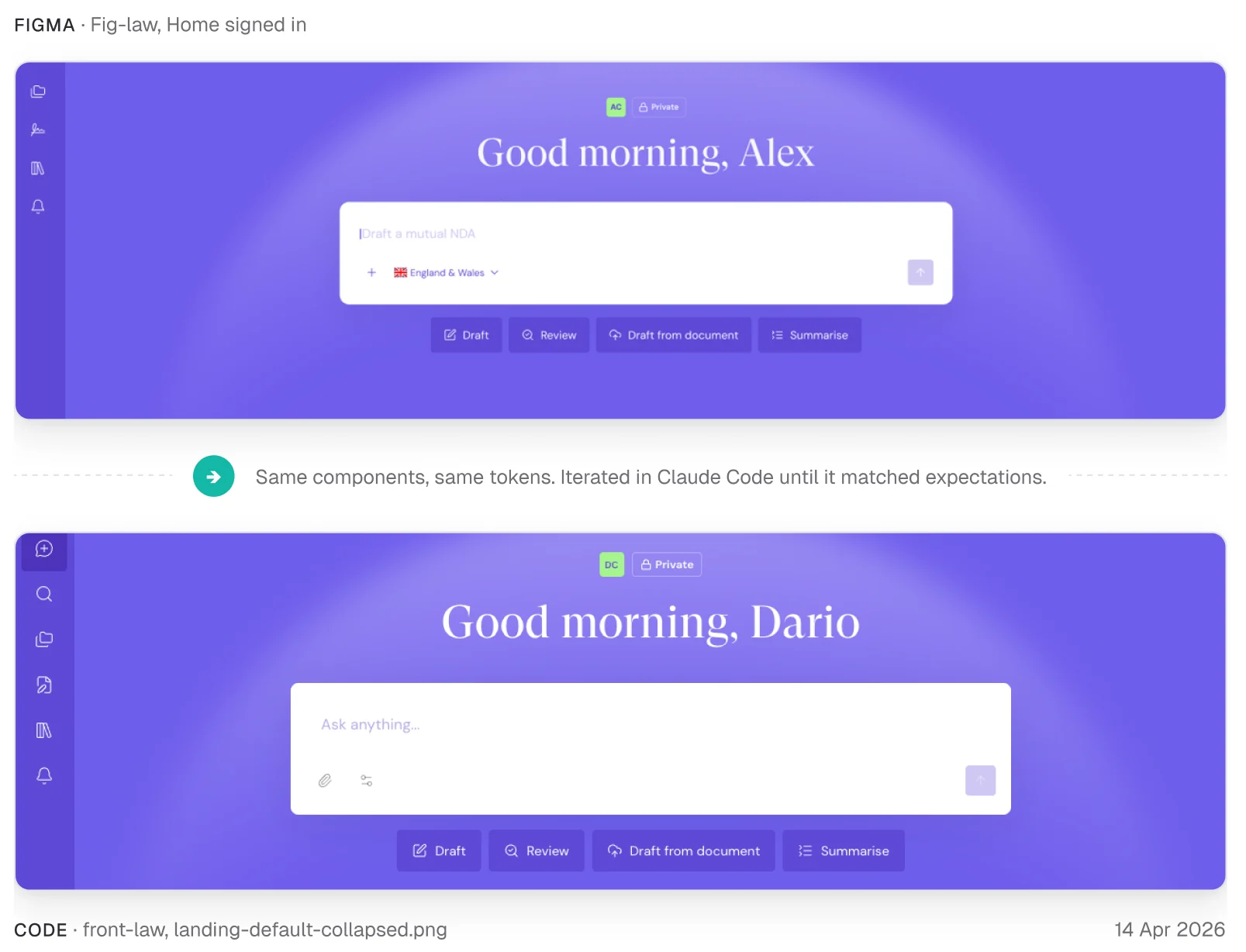
The Figma frame and the built page. The signed-in landing page in Figma above and as iterated in Claude Code below, with a note between them on the components and tokens both use.
Generating Figma screens from the real library
Going the other way, agents had drawn shapes, hex values and hand-rolled positioning into Figma. The same pipeline also ran in that direction, to let anyone build a screen in Figma. When someone asks for a screen in plain words, the agent builds three variants of it in one pass from the library, with components by key, colours as variables and auto-layout throughout, checked against a template. A single command has the agent classify the request, create the file, update the ticket and repair its own rules when a run goes wrong. Because of those repairs, the command’s playbook grew from one file to twelve over three weeks.
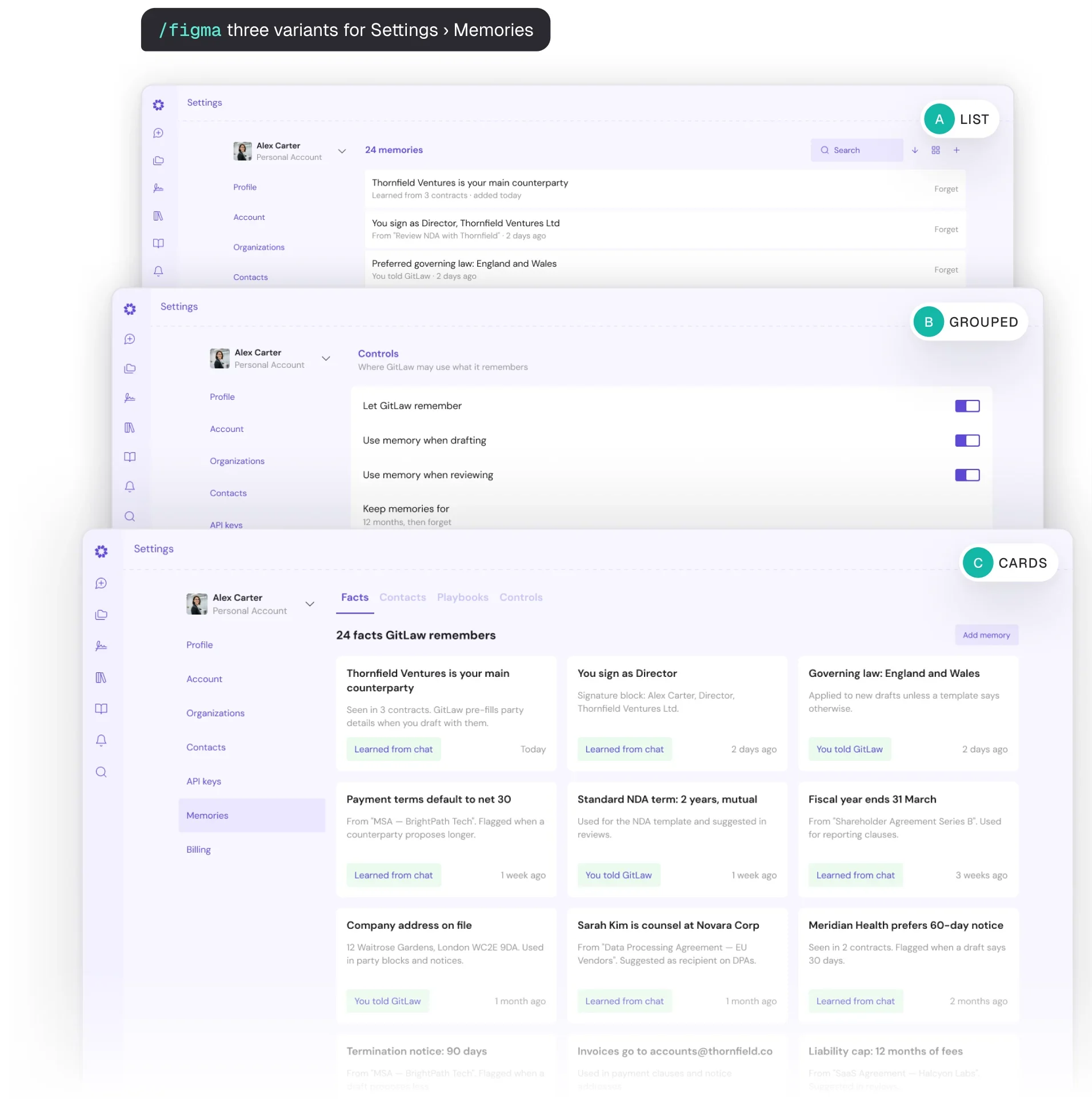
Three variants from one command. The same Settings memories screen as a list, as grouped controls and as cards.
05Validation
Checking it against other practitioners
To check that the process held up outside our own repo, I posted an outline of it publicly for other practitioners: Storybook in the repo, align the Figma library, shells as templates. People who replied confirmed that others were automating the same loop, and I used their replies to improve the process further. One of them asked how people who never touch a coding agent could still take part, and I took that gap on next.
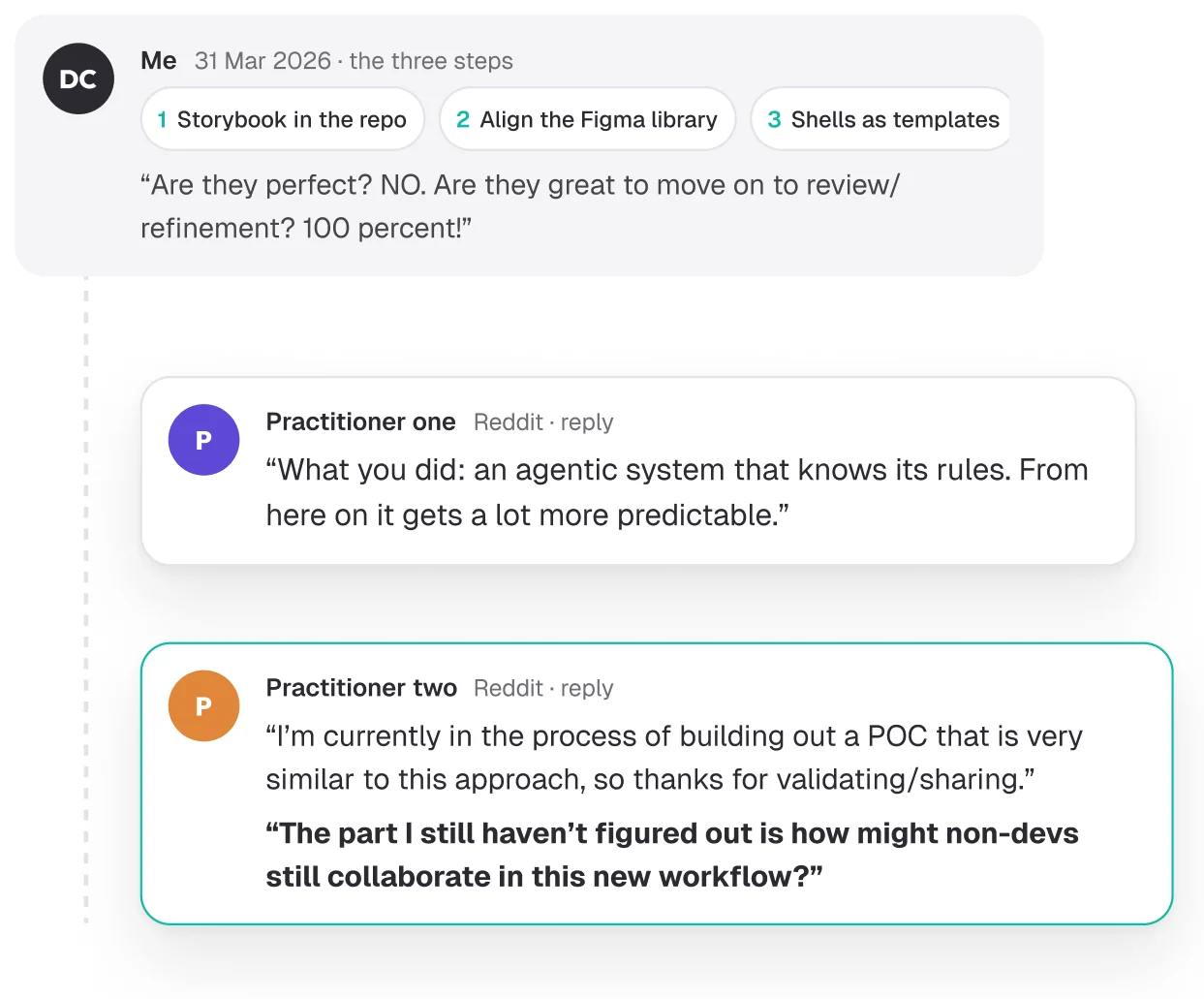
The thread. The outline with two replies from other practitioners, the second one highlighted.
06Improvements
Letting product and the CEO prototype and validate ideas
Adoption had stopped at designers and developers, the gap raised in the thread. To let product and the CEO explore and validate fresh ideas, I set up a sibling repo for early-stage prototyping. It works for people who do not write code because it differs from the product repo in three deliberate ways.
- It keeps the tokens and design language of front-law, the front-end repo, and holds to its components loosely, to leave more room for exploration.
- It holds full product context, so explorations take account of what the product can do and what the stack allows.
- It keeps project status in the repo, so a prototype can be evolved across sessions.
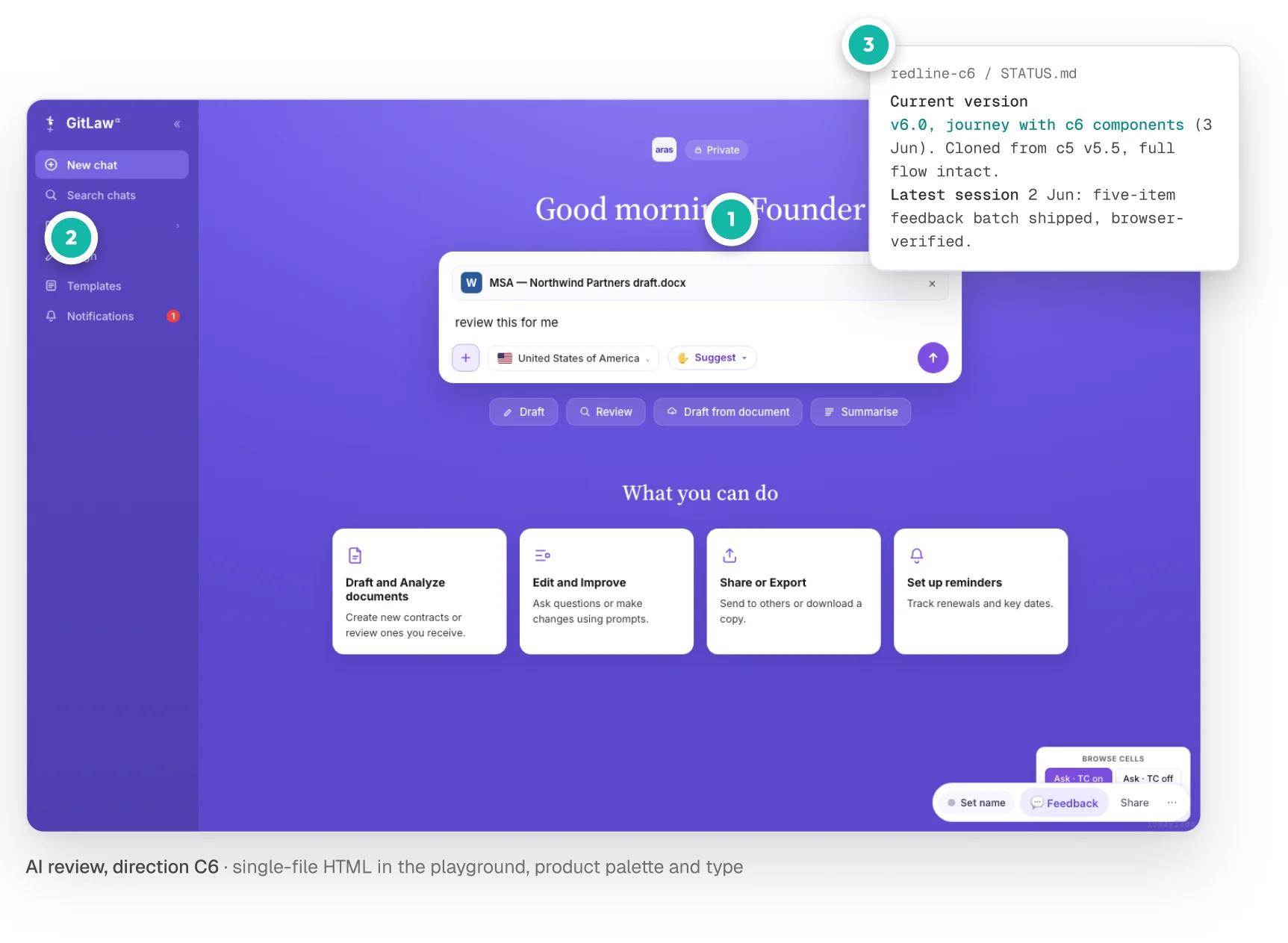
A prototype in the playground. Single-file HTML in the product palette and type, with its status file on the right.
Of the three gaps that remained, the Figma library, which a person still had to align with Storybook, mattered most. In the next project, agents own the design cycle end to end without anyone keeping a library in step by hand. I describe that work in Building Fiuto.
Sources
- Figma to code presentation ↗Figma, 2026, the source of every figure
Contact
Get in touch
Product design lead across research, design systems and handover, with coding agents in the loop. Contract, outside IR35, or a permanent lead role.
- Available
- Now
- Location
- London, remote or hybrid, UK and EU
- Right to work
- UK settled status, EU citizen
- RolesLead Product Designer, Principal Product Designer, Design Engineer
- Experience10+ years
- ScopeResearch, design systems, prototyping, handover, QA with agents
- LanguagesEnglish, Italian, Spanish
- Email[email protected]
- LinkedInlinkedin.com/in/dariocodipietro
Professional profile
Copy into your coding agentSkills
- Product design, end to end
- UX and interaction design
- Visual design and motion
- Prototyping in Figma and code
- Design systems at scale
- User research and testing
- A/B testing and analytics
- Strategy and discovery
- AI product design
- Design to code, with agents
- Accessibility, WCAG 2.2 AA
- Leadership and mentoring
Platforms
iOS, Android, responsive web, smart TV and connected devices
Sectors
- AI products
- B2B SaaS
- Consumer apps
- Streaming, media and sport
- Health, wellness and food
- Legal tech
- Telecoms and utilities
Tools
- Figma
- FigJam
- Figma Make
- Claude Design
- Framer
- Axure RP
- Storybook
- Claude Code
- Cursor
- Codex
- MCP
- GitHub
- Linear
- Jira
- Confluence
- Notion
- Miro
- Prolific
- Lyssna
- Maze
- PostHog
- Amplitude